See what's hitting your account this week, right in your calendar
Calendar for YNAB syncs your transactions to Google Calendar, Apple Calendar, or Outlook. Built for YNAB users who manage cash flow across multiple accounts and want to see what's coming up without opening a second app.

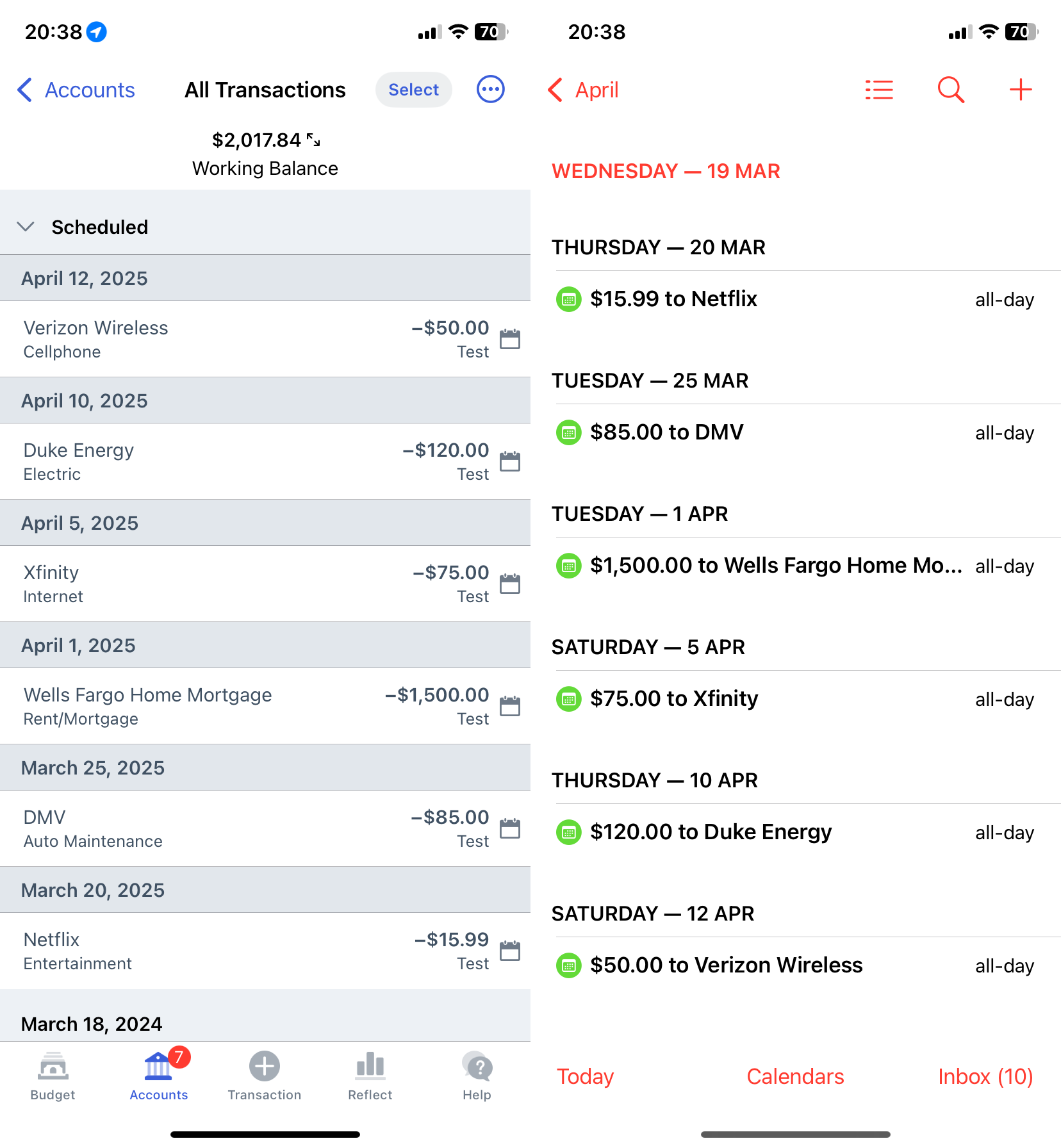
How It Works
Connect YNAB
Sign in with your YNAB account. Takes less than a minute.
Generate Calendar
We create a personal calendar feed so you can see what's coming and what's already happened.
Subscribe
Add it to Google Calendar, Apple Calendar, or Outlook. It stays in sync automatically.
Is this for you?
Calendar for YNAB is built for people who check their phone calendar more than they open YNAB, manage cash flow across multiple accounts (like keeping spending and savings at separate banks), or want to see upcoming bills alongside their meetings without opening a second app.
It's probably not for you if you assign every dollar on payday and don't think much about payment timing. That's a great way to use YNAB. This tool just solves a different problem.
Why Calendar for YNAB?
Plan Your Money and Your Time Together
See upcoming payments alongside your meetings and events. No more switching between apps to figure out what's due.
Never Miss a Payment
Your transactions sync automatically every 15 minutes. If something changes in YNAB, your calendar updates too.
Right Where You Already Look
Works with Google Calendar, Apple Calendar, Microsoft 365, Outlook, and any app that supports iCalendar subscriptions.
Your Data, Handled Honestly
Read-only access
Calendar for YNAB connects via the official YNAB API with read-only access. It is technically impossible for this app to make any changes to your budget.
Your password stays with YNAB
YNAB approves all third-party apps before they can connect to user accounts. Sign in uses YNAB's official OAuth flow. We never see your password. You can revoke access from your YNAB account at any time.
Your data, stored securely
YNAB recommends that third-party apps store transaction data on their own servers and only request changes since the last sync. That's how Calendar for YNAB works. Your data is encrypted, only ever used to generate your calendar feed, and never sold or shared. You can permanently delete your account and all your data from your account page at any time.
Simple, Transparent Pricing
- Scheduled and past transactions
- Works with any calendar app
- Stays in sync automatically
- 1 month free trial
Syncing transactions for 100+ active YNAB users
Questions & Answers
Do you store my transaction data?
Yes. YNAB recommends that third-party apps store transaction data on their own servers and only request changes since the last sync, rather than re-fetching everything on every request. That's how Calendar for YNAB works. Your data is encrypted, only used to generate your calendar feed, and never sold or shared. You can permanently delete your account and all your data from your account page at any time.
Is my YNAB data safe?
Yes. We connect via the official YNAB API. We never see your password and we never modify your budget. All stored data is encrypted at rest with AES-256.
What calendar apps are supported?
Any app that supports iCalendar subscriptions, including Google Calendar, Apple Calendar, Microsoft 365, Outlook, Cozi, and many more.
Can you modify my YNAB budget?
No. Calendar for YNAB only reads your transactions. We never make changes to your budget.
What happens when my trial ends?
Your subscription activates automatically when the trial ends. You can cancel anytime from your account page.
How often does it sync?
Every 15 minutes. You can also trigger a manual sync from the dashboard.
Try it free for a month, no commitment
Try it free for a month. Cancel anytime.
Start My Free TrialRead-only YNAB access · Encrypted and never shared · Syncing for 100+ YNAB users · Built by Willem Handreck in Geelong, Australia · Running since 2024